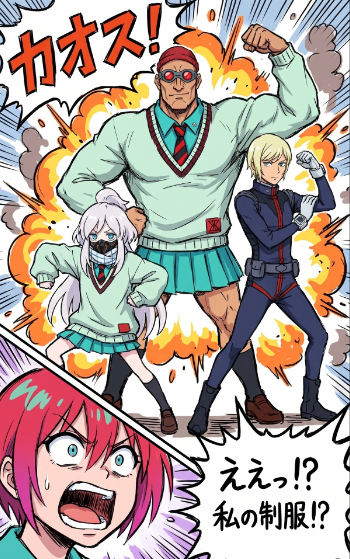
Chaotic Manga Uniform Transformation
Generates a polished explosive manga scene from rough layout and character sketch references, useful for turning WIP thumbnails into finished comic-style art.
웹, 앱, 대시보드 화면 시안에 적합합니다. 구조를 유지하고 내 서비스 문구와 브랜드 요소로 바꾸면 됩니다.
추천 비율
16:9 또는 4:3
품질 전략
먼저 가볍게 생성하고 좋은 안을 고해상도로 다듬기
생성 흐름
참고 이미지나 기존 레이아웃에 맞춰야 할 때는 이미지-이미지를 사용하고, 그 외에는 텍스트 생성으로 방향을 잡으세요.
전체 Qwen Image 프롬프트
English prompt
Using REFERENCE_0 as the rough composition guide and REFERENCE_1 as the character/pose guide, turn the sketch into a polished, high-energy manga/anime illustration. Keep the same 4-character arrangement: 1 huge muscular student centered in back flexing one arm, 1 small white-haired student at lower left in a crouched/action pose, 1 slim standing student at right raising a fist, and 1 shocked pink-haired close-up face cropped at the bottom left. Convert the loose colored sketch into clean inked line art with vibrant cel shading, sharp comic-panel energy, and exaggerated perspective. Add a chaotic explosion background behind the three full-body characters with orange-yellow fire bursts, smoke puffs, speed lines, impact spikes, and comic burst shapes. Add 2 visible Japanese text elements: a large top-left sound effect {argument name="sound effect text" default="カオス!"} and a jagged speech bubble at bottom right reading {argument name="speech bubble text" default="えぇっ!?\n私の制服!?"}. Preserve the school-uniform theme from REFERENCE_1 but render it as finished clothing: mint sweater and teal skirt styling for the center and left characters, a dark fitted uniform for the right character, and a close-up shocked face in the lower-left foreground. Use a dynamic shonen-comedy manga page style with thick outlines, dramatic motion lines, saturated colors, and layered comic effects.관련 Qwen Image 프롬프트
VR Headset Exploded View Poster
Generates a high-tech exploded view diagram of a VR headset with detailed component callouts and promotional text.
Illustrated City Food Map
Generates a hand-drawn, watercolor-style tourist map featuring numbered local food specialties, landmarks, and a legend.
E-commerce Live Stream UI Mockup
Generates a realistic social media live stream interface overlaying a portrait, featuring customizable chat messages, gift popups, and a product purchase card.
Knight-Mage Battles Stone Golem
A cinematic fantasy battle scene for generating epic game-style artwork of an armored heroine fighting a giant stone golem in a ruined cathedral.
Censored Elven Adventurers in Medieval Village
Generates a cinematic fantasy scene of two detailed elven adventurers walking through a medieval village with castle backdrop and obscured faces.
Faceless Cyberpunk Infiltrator
Generates a cinematic anime scene of an armed faceless woman infiltrating a high-security futuristic server room.