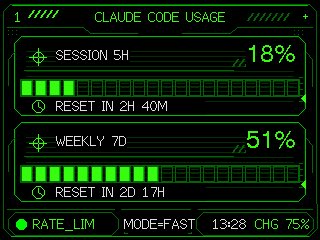
Neon M5Stack Usage Gauge
Transforms a simple Claude Code usage gauge into a polished neon HUD dashboard for an embedded M5Stack-style screen.
适合生成网页、App 或仪表盘界面稿:先保留模块结构,再替换成你的业务文案和品牌视觉。
画幅建议
16:9 或 4:3
细节策略
先快速出图,再细节精修
生成流程
需要贴合参考图或既有版式时,用图生图;其他情况先用文字生成定方向。
完整 Qwen Image 提示词
English prompt
Using the provided reference image as the functional UI base, redesign it into a polished neon-green cyberpunk terminal interface suitable for an M5Stack-style 320×240 display. Keep the same two usage meters and overall information hierarchy, but replace the plain black layout with thin glowing vector line art, angular framed panels, pixel/monospace typography, and sci-fi HUD decorations. Convert the two meters into 2 stacked framed cards: 1) “SESSION 5H” with a crosshair icon, large percentage “{argument name="session percent" default="18%"}”, a segmented horizontal progress bar, and a clock/reset row reading “{argument name="session reset text" default="RESET IN 2H 40M"}”; 2) “WEEKLY 7D” with a crosshair icon, large percentage “{argument name="weekly percent" default="51%"}”, a segmented horizontal progress bar, and a clock/reset row reading “{argument name="weekly reset text" default="RESET IN 2D 17H"}”. Add a top header reading “{argument name="header text" default="CLAUDE CODE USAGE"}” centered, with decorative diagonal tick marks on both sides and a small plus sign at the top right. Add a bottom status bar with exactly 5 visible items: a green status dot, “RATE_LIM”, “MODE=FAST”, “13:28”, and “CHG 75%”. Use only black background, bright green strokes, darker green grid/bar outlines, and crisp pixel-perfect rendering; make the final image look like a refined embedded-device dashboard rather than a flat mockup.相关 Qwen Image 提示词
VR Headset Exploded View Poster
Generates a high-tech exploded view diagram of a VR headset with detailed component callouts and promotional text.
Illustrated City Food Map
Generates a hand-drawn, watercolor-style tourist map featuring numbered local food specialties, landmarks, and a legend.
E-commerce Live Stream UI Mockup
Generates a realistic social media live stream interface overlaying a portrait, featuring customizable chat messages, gift popups, and a product purchase card.
Knight-Mage Battles Stone Golem
A cinematic fantasy battle scene for generating epic game-style artwork of an armored heroine fighting a giant stone golem in a ruined cathedral.
Censored Elven Adventurers in Medieval Village
Generates a cinematic fantasy scene of two detailed elven adventurers walking through a medieval village with castle backdrop and obscured faces.
Faceless Cyberpunk Infiltrator
Generates a cinematic anime scene of an armed faceless woman infiltrating a high-security futuristic server room.