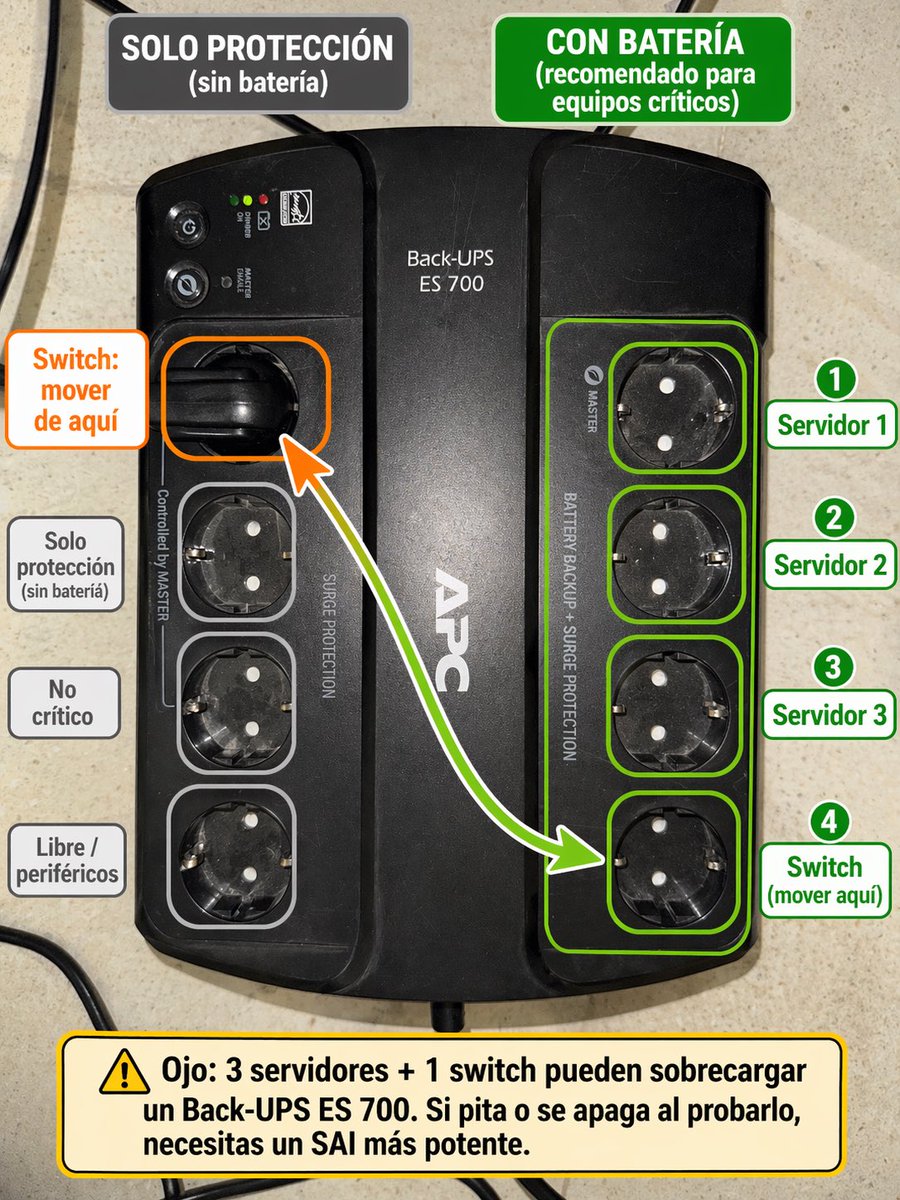
Spanish UPS outlet wiring infographic
This prompt turns a reference photo of a UPS into a labeled Spanish instructional diagram showing which sockets to use for critical equipment and where to move the switch.
This infographic prompt is a strong starting point when you need a composed Qwen Image result with a clear subject, visual structure, and reusable style direction.
Aspect ratio
16:9 or 4:3
Quality pass
Standard first, then high detail
Workflow
Use image-to-image when matching an existing layout or subject matters.
Full Qwen Image prompt
English prompt
Using the provided reference image of the APC Back-UPS, turn it into a clear Spanish annotated setup guide overlaid directly on the photo. Keep the UPS photo realistic and unchanged as the base, but add color-coded callouts showing which outlets are battery-backed versus surge-only. At the top, add 2 header boxes: on the left a dark gray box reading "SOLO PROTECCIÓN (sin batería)", and on the right a green box reading "CON BATERÍA (recomendado para equipos críticos)". Highlight the 4 right-side outlets with a green outline group and individual green outlines, and place 4 numbered green labels on the right: "1 Servidor 1", "2 Servidor 2", "3 Servidor 3", "4 Switch (mover aquí)". On the left, highlight the currently used upper-left outlet with an orange outline and add an orange callout box reading "Switch: mover de aquí", plus a curved arrow from that outlet to the bottom outlet of the right-side green group. Also outline the 3 lower-left outlets in light gray and add 3 gray labels on the left aligned to them: "Solo protección (sin batería)", "No crítico", and "Libre / periféricos". At the bottom, add a large yellow warning box with a caution icon and this text: "Ojo: 3 servidores + 1 switch pueden sobrecargar un Back-UPS ES 700. Si pita o se apaga al probarlo, necesitas un SAI más potente." Clean infographic style, readable bold typography, neat rounded rectangles, high contrast, and practical IT-diagram presentation.
Related Qwen Image prompts
VR Headset Exploded View Poster
Generates a high-tech exploded view diagram of a VR headset with detailed component callouts and promotional text.
Illustrated City Food Map
Generates a hand-drawn, watercolor-style tourist map featuring numbered local food specialties, landmarks, and a legend.
3D Stone Staircase Evolution Infographic
Transforms a flat evolutionary timeline into a realistic 3D stone staircase infographic with detailed organism renders and structured side panels.
Momotaro Explainer Slide in Hybrid Style
A prompt that combines the simple, warm aesthetic of simple illustration style illustrations with the high-information density characteristic of Japanese government slides.
Faceless Cyberpunk Infiltrator
Generates a cinematic anime scene of an armed faceless woman infiltrating a high-security futuristic server room.
Pancake Angel Cafe Cover
Generates a dreamy watercolor anime cover of a winged cafe angel serving honey pancakes in a sunlit morning cafe.