제품 디자인영어
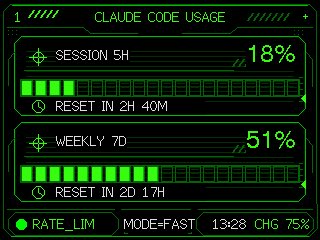
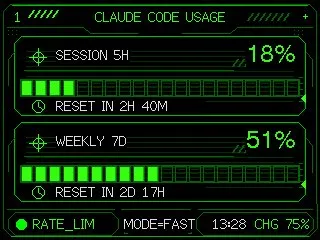
Neon M5Stack Usage Gauge
Transforms a simple Claude Code usage gauge into a polished neon HUD dashboard for an embedded M5Stack-style screen.
UI 시안, 아이콘, 앱 화면, 3D 제품 표현에 적합합니다. 기능 구조, 재질, 보여줄 각도를 구체적으로 적으면 더 실용적입니다.
추천 비율
1:1 또는 4:5
품질 전략
먼저 가볍게 생성하고 좋은 안을 고해상도로 다듬기
생성 흐름
참고 이미지나 기존 레이아웃에 맞춰야 할 때는 이미지-이미지를 사용하고, 그 외에는 텍스트 생성으로 방향을 잡으세요.
전체 Qwen Image 프롬프트
영어
Using the provided reference image as the functional UI base, redesign it into a polished neon-green cyberpunk terminal interface suitable for an M5Stack-style 320×240 display. Keep the same two usage meters and overall information hierarchy, but replace the plain black layout with thin glowing vector line art, angular framed panels, pixel/monospace typography, and sci-fi HUD decorations. Convert the two meters into 2 stacked framed cards: 1) “SESSION 5H” with a crosshair icon, large percentage “{argument name="session percent" default="18%"}”, a segmented horizontal progress bar, and a clock/reset row reading “{argument name="session reset text" default="RESET IN 2H 40M"}”; 2) “WEEKLY 7D” with a crosshair icon, large percentage “{argument name="weekly percent" default="51%"}”, a segmented horizontal progress bar, and a clock/reset row reading “{argument name="weekly reset text" default="RESET IN 2D 17H"}”. Add a top header reading “{argument name="header text" default="CLAUDE CODE USAGE"}” centered, with decorative diagonal tick marks on both sides and a small plus sign at the top right. Add a bottom status bar with exactly 5 visible items: a green status dot, “RATE_LIM”, “MODE=FAST”, “13:28”, and “CHG 75%”. Use only black background, bright green strokes, darker green grid/bar outlines, and crisp pixel-perfect rendering; make the final image look like a refined embedded-device dashboard rather than a flat mockup.관련 Qwen Image 프롬프트
제품 디자인
抽象矢量图标素材项目
生成一个包豪斯风格的几何图标样式项目,包含六个抽象的前端素材主题和一条七色调色板。
제품 디자인
日本 AI 商业信息图
生成一张简洁的四步日本风格信息图,解释如何将 AI 创意与实际业务流程相结合。
제품 디자인
Minimal Developer Portfolio Homepage
Generates a clean grid-based personal website homepage mockup for a software engineer portfolio design system.
제품 디자인
晨露粉蝶花微距摄影
生成一张写实的微距照片,展现晨曦中挂满露珠的蓝色粉蝶花,非常适合用于梦幻般的自然花卉艺术创作。
제품 디자인
日语阅读教学信息图
将手写的日语教学笔记转换为结构化的信息图,以便与教育工作者分享课程设计理念。
제품 디자인
streaming platform 首页 UI 生成器
一个功能性提示词,用于创建 streaming platform 首页 UI,通过上传的图片生成电影标题和海报。