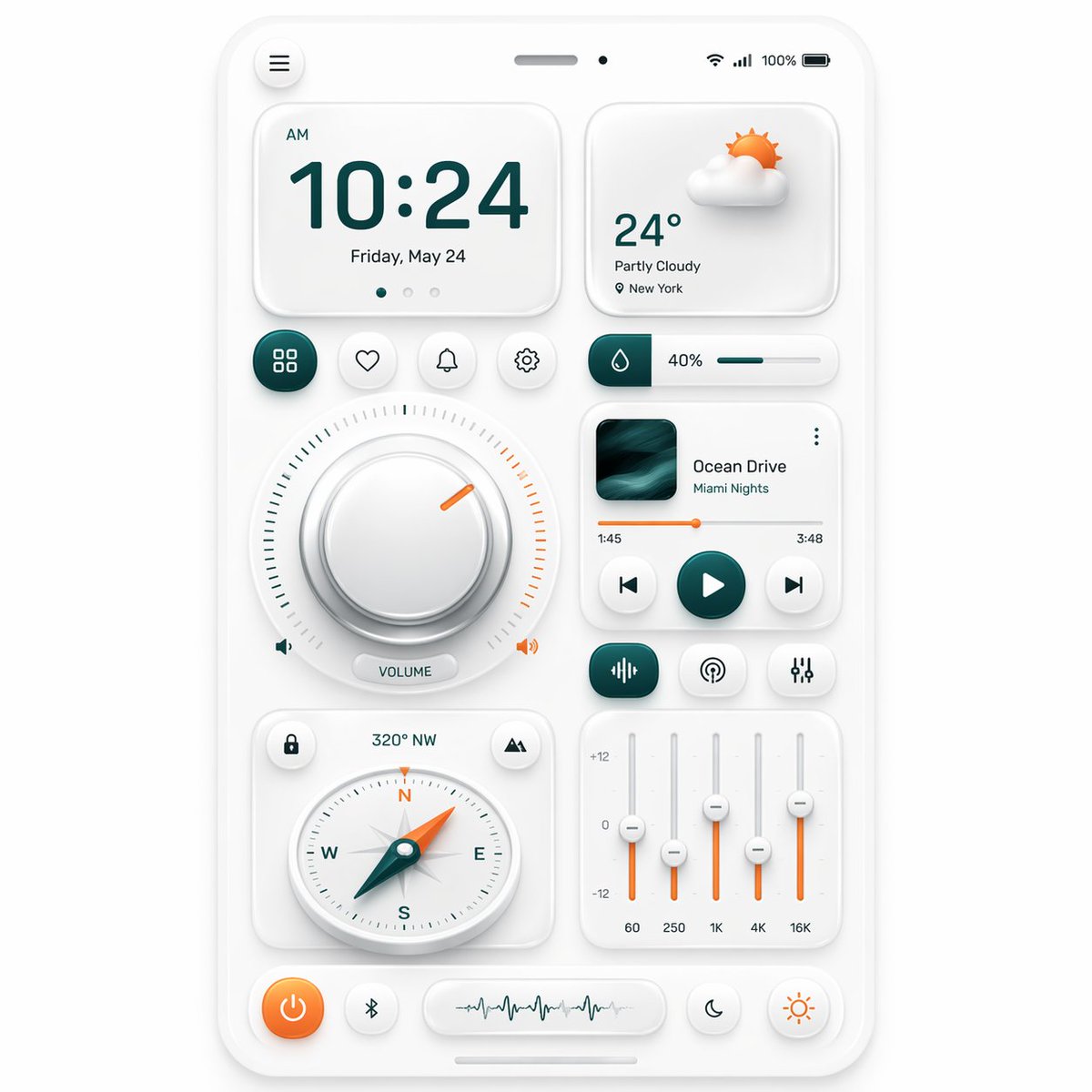
Neumorphic Smart Dashboard UI
This prompt generates a polished neumorphic smartphone control dashboard mockup for app design showcases, UI concept art, and premium interface presentations.
상품 사진, 패키지, 브랜드 광고 초안 제작에 적합합니다. 주체, 재질, 배경, 상업 보정 방향이 잡혀 있어 변수만 바꿔도 빠르게 시도할 수 있습니다.
추천 비율
1:1 또는 4:5
품질 전략
고해상도 디테일로 마감
생성 흐름
먼저 텍스트로 핵심 이미지를 만들고, 한 번에 중요한 요소 하나만 수정하세요.
전체 Qwen Image 프롬프트
English prompt
A clean neumorphic mobile dashboard UI mockup shown straight-on, centered on a soft light gray background, inside a white rounded smartphone frame with subtle embossed shadows and glossy soft highlights. The interface uses a minimalist white-on-white design with teal green and warm orange accent colors. At the very top of the phone, include a small circular menu button on the left, a centered speaker slit and front camera dot, and status icons on the right showing Wi‑Fi, signal, 100%, and battery. The main layout contains 12 distinct UI modules: 1 large time card at upper left showing “AM”, “10:24”, and “Friday, May 24” with three tiny pagination dots beneath; 1 weather card at upper right showing a soft 3D partly cloudy sun icon, “24°”, “Partly Cloudy”, and “New York”; 4 small circular action buttons in one row under the time card, showing a grid icon, heart, bell, and gear, with the grid button filled in dark teal; 1 slim horizontal slider card to the right of those buttons with a droplet icon, “40%”, and a teal progress bar; 1 large circular volume control occupying the left middle area, with a thick beveled silver knob, a surrounding tick-mark ring split into teal on the left and orange on the right, a short orange indicator line near the upper right, tiny speaker icons on both sides, and a pill label reading “VOLUME”; 1 music player card on the right middle with square album art in dark teal waves, the title “Ocean Drive”, subtitle “Miami Nights”, a thin orange playback progress line with times “1:45” and “3:48”, and three circular transport controls for previous, play, and next, with the play button filled teal; 3 small rounded buttons in a row beneath the music player, showing an equalizer icon filled teal, a broadcast icon, and sliders icon; 1 compass card at lower left with small circular buttons in the top corners, heading text “320° NW” above, and a detailed analog compass with N, E, S, W letters and a teal-and-orange needle pointing northwest; 1 equalizer card at lower right with four vertical sliders, scale markings “+12”, “0”, “-12”, and bottom frequency labels “60”, “250”, “1K”, “4K”, “16K”, using orange slider stems and white knobs; and 5 bottom dock controls: an orange circular power button, a small Bluetooth button, a central pill waveform panel, a crescent moon button, and a sun brightness button. Use soft ambient shadows, gentle inner embossing, rounded corners, precise spacing, and a premium futuristic smart-home or control-center aesthetic inspired by high-end dribbble neumorphism, ultra-detailed, crisp vector UI, realistic depth, polished product presentation.
관련 Qwen Image 프롬프트
VR Headset Exploded View Poster
Generates a high-tech exploded view diagram of a VR headset with detailed component callouts and promotional text.
E-commerce Live Stream UI Mockup
Generates a realistic social media live stream interface overlaying a portrait, featuring customizable chat messages, gift popups, and a product purchase card.
Pancake Angel Cafe Cover
Generates a dreamy watercolor anime cover of a winged cafe angel serving honey pancakes in a sunlit morning cafe.
Summer Grape Girl 3x3 Grid Portrait
A comprehensive prompt for creating a 3x3 photo grid of a summer-themed 'Grape Girl' with specific instructions for consistency and style.
Mystical Japanese AI Face Reading Report
Generates an ornate Japanese fortune-telling appraisal sheet with a celestial portrait, moonlit gold layout, and multiple readable report sections.
Miniature City Tiny Worlds
A macro photography prompt creating a realistic miniature city built within human hair, featuring high detail and natural skin textures.