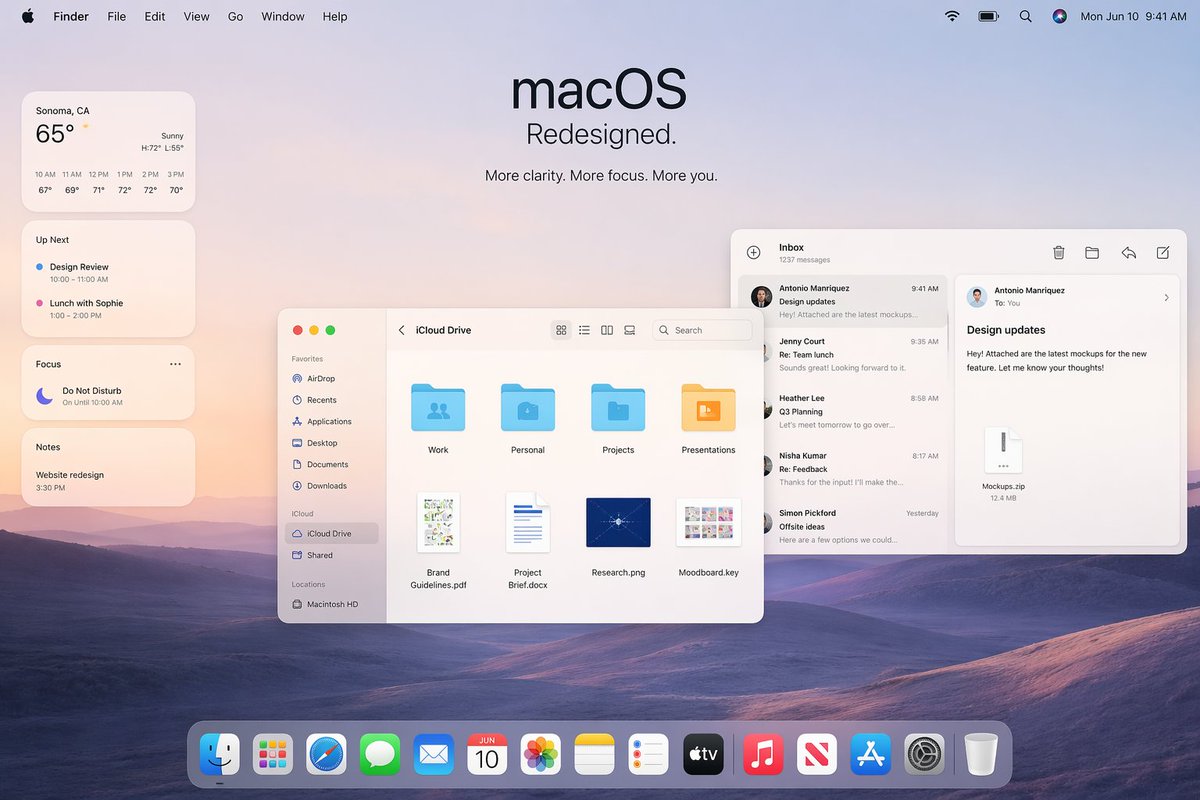
Apple macOS Redesign Promo Mockup
A sleek Apple-style macOS desktop hero image for keynote slides, product marketing, or UI concept presentations.
상품 사진, 패키지, 브랜드 광고 초안 제작에 적합합니다. 주체, 재질, 배경, 상업 보정 방향이 잡혀 있어 변수만 바꿔도 빠르게 시도할 수 있습니다.

추천 비율
1:1 또는 4:5
품질 전략
먼저 가볍게 생성하고 좋은 안을 고해상도로 다듬기
생성 흐름
먼저 텍스트로 핵심 이미지를 만들고, 한 번에 중요한 요소 하나만 수정하세요.
전체 Qwen Image 프롬프트
English prompt
A polished Apple-style macOS promotional desktop mockup shown as a full-screen screenshot, with a soft pastel dawn wallpaper of layered purple-blue rolling hills under a pale peach and lavender sky. Centered near the top is a large minimalist headline reading "macOS" with the subheadline "Redesigned." and a smaller line below that says "More clarity. More focus. More you." The top system menu bar is visible across the full width: Apple logo, Finder, File, Edit, View, Go, Window, Help on the left; Wi‑Fi, battery, search, colorful user icon, and the date/time "Mon Jun 10 9:41 AM" on the right. On the left side, stack 4 translucent rounded widgets vertically: a weather widget for "Sonoma, CA" showing "65°", "Sunny", high/low "H:72° L:55°", and 6 hourly temperatures from 10 AM to 3 PM; an "Up Next" widget with 2 calendar items, "Design Review" and "Lunch with Sophie" with times; a "Focus" widget showing "Do Not Disturb" and "On Until 10:00 AM"; and a "Notes" widget with the note "Website redesign" and time "3:30 PM". In the middle-left foreground, place a Finder window with rounded corners and a light frosted interface, titled "iCloud Drive". Include a left sidebar with 10 items total: Favorites with 6 items "AirDrop", "Recents", "Applications", "Desktop", "Documents", "Downloads"; iCloud with 2 items "iCloud Drive" and "Shared"; and Locations with 1 item "Macintosh HD". In the main Finder area show 8 file items arranged in a grid: 4 folders on the top row labeled "Work", "Personal", "Projects", "Presentations", and 4 documents on the bottom row labeled "Brand Guidelines.pdf", "Project Brief.docx", "Research.png", "Moodboard.key". Add standard macOS traffic-light window buttons and small view/search controls in the title bar. On the right side, overlap a Mail app window with a three-column layout. The left mail list column is titled "Inbox" and shows "1237 messages" plus 5 visible senders/messages: "Antonio Manriquez" with subject "Design updates", "Jenny Court" with "Re: Team lunch", "Heather Lee" with "Q3 Planning", "Nisha Kumar" with "Re: Feedback", and "Simon Pickford" with "Offsite ideas". The reading pane shows the selected message from Antonio Manriquez to You with subject "Design updates" and body text about attached mockups for a new feature, plus a file attachment card labeled "Mockups.zip" and "12.4 MB". Use clean SF Pro-style typography, subtle shadows, translucent glassmorphism panels, soft ambient lighting, and a premium Apple keynote aesthetic. At the bottom center, include a glossy translucent macOS Dock with 15 icons: Finder, Launchpad, Safari, Messages, Mail, Calendar showing "JUN 10", Photos, Notes, Reminders, TV, Music, News, App Store, Settings, and Trash. Composition should feel balanced, airy, realistic, and highly refined, like an official Apple macOS redesign announcement image.
관련 Qwen Image 프롬프트
VR Headset Exploded View Poster
Generates a high-tech exploded view diagram of a VR headset with detailed component callouts and promotional text.
E-commerce Live Stream UI Mockup
Generates a realistic social media live stream interface overlaying a portrait, featuring customizable chat messages, gift popups, and a product purchase card.
Pancake Angel Cafe Cover
Generates a dreamy watercolor anime cover of a winged cafe angel serving honey pancakes in a sunlit morning cafe.
Summer Grape Girl 3x3 Grid Portrait
A comprehensive prompt for creating a 3x3 photo grid of a summer-themed 'Grape Girl' with specific instructions for consistency and style.
Mystical Japanese AI Face Reading Report
Generates an ornate Japanese fortune-telling appraisal sheet with a celestial portrait, moonlit gold layout, and multiple readable report sections.
Miniature City Tiny Worlds
A macro photography prompt creating a realistic miniature city built within human hair, featuring high detail and natural skin textures.