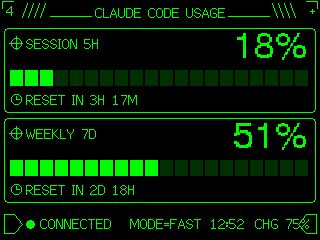
Retro Claude Code Usage Gauge
Transforms a simple usage meter reference into a neon-green pixel terminal dashboard suitable for an M5Stack-style device UI.
図解、チェックリスト、ロードマップ、学習用長図に向いています。情報階層を先に決め、画像内テキストは短くすると安定します。
推奨比率
16:9 または 4:3
品質の進め方
まず軽く生成し、良い案を高精細で詰める
生成フロー
参考画像や既存レイアウトに合わせたい場合は画像から画像を使い、それ以外はテキスト生成で方向性を固めます。
Qwen Image 完全プロンプト
English prompt
Using REFERENCE_0 as the functional layout and data source, redesign it as a polished monochrome neon-green retro terminal UI for an M5Stack-style low-resolution display. Keep the same concept of a Claude Code usage gauge with 2 usage panels: SESSION 5H and WEEKLY 7D. Convert the plain progress bars into segmented pixel bars with 24 rectangular blocks each, preserve the approximate usage values but update the visible numbers to {argument name="session percentage" default="18%"} and {argument name="weekly percentage" default="51%"}. Add thin glowing green borders around each panel, pixel/bitmap typography, small target/crosshair icons beside the panel titles, and clock icons beside the reset lines. Replace the simple title with a decorative header reading {argument name="headline text" default="CLAUDE CODE USAGE"}, flanked by terminal-like slashes and line ornaments. At the bottom, add a retro status row with a flag/terminal outline icon, green connection dot, {argument name="connection label" default="CONNECTED"}, MODE=FAST, {argument name="time" default="12:52"}, and CHG 75% with a small battery/charging icon. Use a black background, bright CRT green lines, crisp pixel art styling, and make the result look like a refined embedded-device dashboard rather than a flat chart.関連するQwen Imageプロンプト
VR Headset Exploded View Poster
Generates a high-tech exploded view diagram of a VR headset with detailed component callouts and promotional text.
Illustrated City Food Map
Generates a hand-drawn, watercolor-style tourist map featuring numbered local food specialties, landmarks, and a legend.
3D Stone Staircase Evolution Infographic
Transforms a flat evolutionary timeline into a realistic 3D stone staircase infographic with detailed organism renders and structured side panels.
Momotaro Explainer Slide in Hybrid Style
A prompt that combines the simple, warm aesthetic of simple illustration style illustrations with the high-information density characteristic of Japanese government slides.
Faceless Cyberpunk Infiltrator
Generates a cinematic anime scene of an armed faceless woman infiltrating a high-security futuristic server room.
Pancake Angel Cafe Cover
Generates a dreamy watercolor anime cover of a winged cafe angel serving honey pancakes in a sunlit morning cafe.