Neon M5Stack Usage Gauge
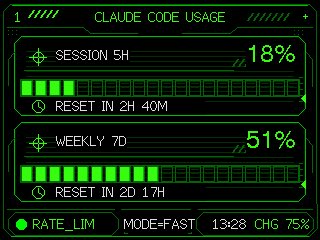
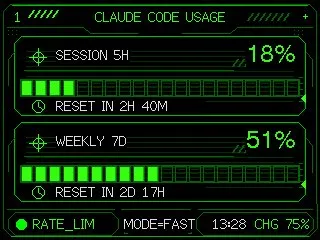
Transforms a simple Claude Code usage gauge into a polished neon HUD dashboard for an embedded M5Stack-style screen.
UI案、アイコン、アプリ画面、3Dプロダクト表現に向いています。機能階層、素材感、見せる角度を具体的にすると使いやすくなります。
推奨比率
1:1 または 4:5
品質の進め方
まず軽く生成し、良い案を高精細で詰める
生成フロー
参考画像や既存レイアウトに合わせたい場合は画像から画像を使い、それ以外はテキスト生成で方向性を固めます。
Qwen Image 完全プロンプト
英語
Using the provided reference image as the functional UI base, redesign it into a polished neon-green cyberpunk terminal interface suitable for an M5Stack-style 320×240 display. Keep the same two usage meters and overall information hierarchy, but replace the plain black layout with thin glowing vector line art, angular framed panels, pixel/monospace typography, and sci-fi HUD decorations. Convert the two meters into 2 stacked framed cards: 1) “SESSION 5H” with a crosshair icon, large percentage “{argument name="session percent" default="18%"}”, a segmented horizontal progress bar, and a clock/reset row reading “{argument name="session reset text" default="RESET IN 2H 40M"}”; 2) “WEEKLY 7D” with a crosshair icon, large percentage “{argument name="weekly percent" default="51%"}”, a segmented horizontal progress bar, and a clock/reset row reading “{argument name="weekly reset text" default="RESET IN 2D 17H"}”. Add a top header reading “{argument name="header text" default="CLAUDE CODE USAGE"}” centered, with decorative diagonal tick marks on both sides and a small plus sign at the top right. Add a bottom status bar with exactly 5 visible items: a green status dot, “RATE_LIM”, “MODE=FAST”, “13:28”, and “CHG 75%”. Use only black background, bright green strokes, darker green grid/bar outlines, and crisp pixel-perfect rendering; make the final image look like a refined embedded-device dashboard rather than a flat mockup.関連するQwen Imageプロンプト
プロダクトデザイン
抽象矢量图标素材项目
生成一个包豪斯风格的几何图标样式项目,包含六个抽象的前端素材主题和一条七色调色板。
プロダクトデザイン
日本 AI 商业信息图
生成一张简洁的四步日本风格信息图,解释如何将 AI 创意与实际业务流程相结合。
プロダクトデザイン
Minimal Developer Portfolio Homepage
Generates a clean grid-based personal website homepage mockup for a software engineer portfolio design system.
プロダクトデザイン
晨露粉蝶花微距摄影
生成一张写实的微距照片,展现晨曦中挂满露珠的蓝色粉蝶花,非常适合用于梦幻般的自然花卉艺术创作。
プロダクトデザイン
日语阅读教学信息图
将手写的日语教学笔记转换为结构化的信息图,以便与教育工作者分享课程设计理念。
プロダクトデザイン
streaming platform 首页 UI 生成器
一个功能性提示词,用于创建 streaming platform 首页 UI,通过上传的图片生成电影标题和海报。